Docs
Where your code goes
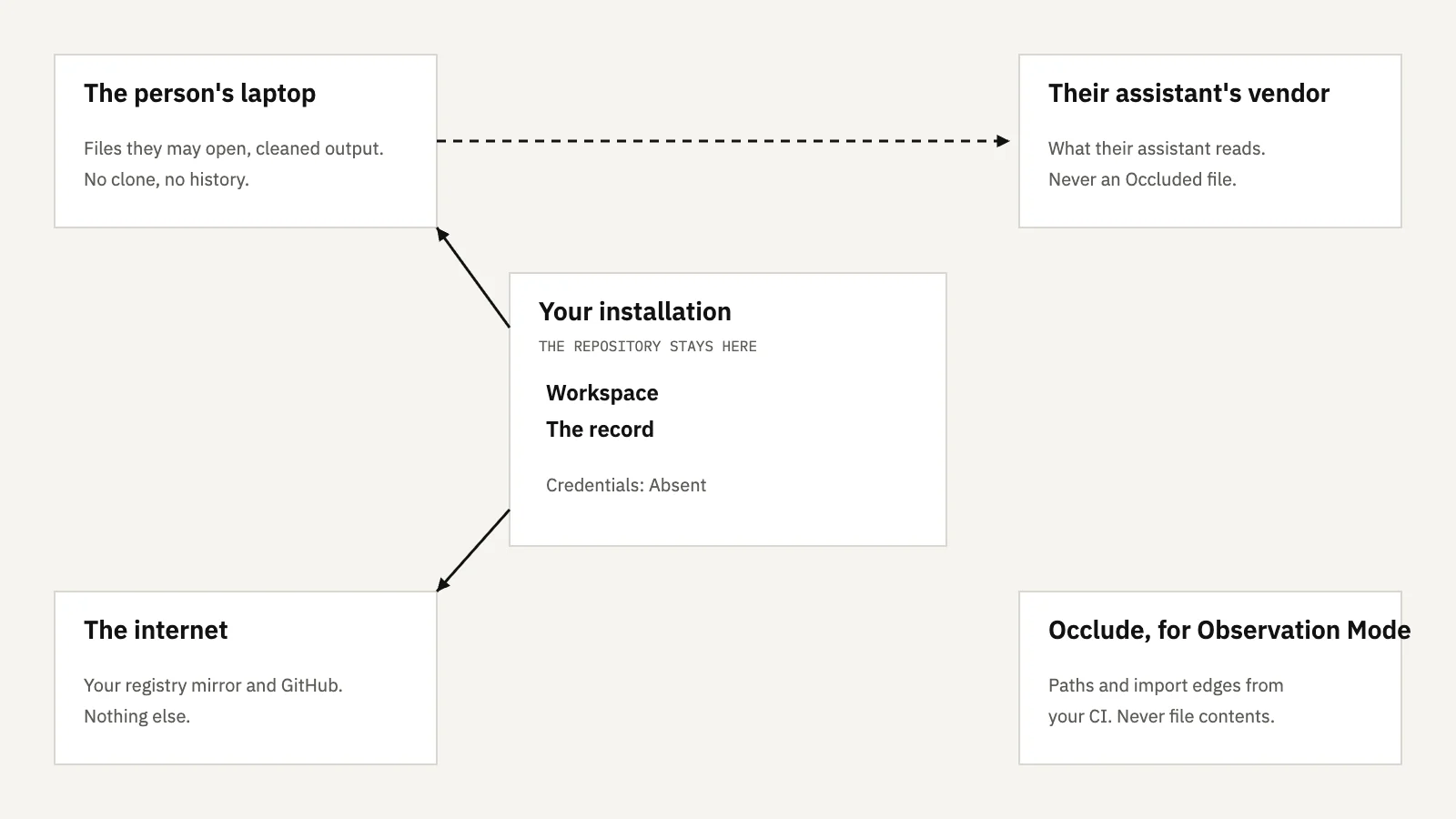
The repository stays in your installation. What leaves it is decided by the workspace, not by a setting in someone's editor or agent. This page says what can reach each place, and what cannot.
The short version
- There is no clone on anyone's laptop. The repository is reachable only through the workspace.
- A person, their editor and their assistant can read the files the grant makes Visible or Read-only, and the declarations that stand in for Occluded modules. Nothing else, through any tool.
- What a person can read can reach their assistant's vendor when they use an assistant. Occlude decides what there is to send; your choice of assistant and its privacy settings decide what that vendor keeps.
- Credentials and data seeds are Absent: they are not in the workspace at all.
By destination
| Destination | Can reach it | Never reaches it |
|---|---|---|
| The person's laptop | The files they open in their editor, the terminal's output, build and test output after sanitisation, the preview | A clone, .git history, Occluded or Absent files, unsanitised output |
| Their assistant's vendor (Cursor, GitHub, Anthropic, OpenAI and others) | What the person's editor or agent sends from the person's side: Visible and Read-only files, declarations, terminal output | Occluded and Absent files, because the assistant cannot read them either |
| The Occlude service | Session events: paths, operations, rules, times. Your model vendor's key, if agents run inside Occlude | File contents leave the workspace only to the person, sanitised. In Observation Mode, no file contents at all |
| The internet, from the workspace | Your package registry mirror and GitHub, scoped to the app | Everything else. Outbound traffic is denied by default |
| The record | Every refused attempt, every command, the full unsanitised output, every grant decision | Credentials' values |
By way of connecting
| Door | Where the code is shown | Where the assistant runs |
|---|---|---|
| Browser workspace | In a browser tab, streamed from the workspace | Inside Occlude, under its own grant, with your model key |
| An editor over SSH (VS Code, Cursor, Zed, Devin Desktop, JetBrains) | In the editor on the laptop. The editor's server runs in the workspace, on the person's side | Usually on the laptop, sending requests to the assistant's vendor. See each editor's page |
| An agent over MCP (Claude Code, Codex, Cursor, Copilot) | In the agent's context, one tool call at a time | On the laptop or in CI, sending requests to its vendor |
| The agent inside Occlude | Nowhere outside the workspace | In the Occlude service, on your key |
| Observation Mode | Nowhere. The recorder runs on your CI runner | Not applicable |
What the assistant can reach
An assistant attached to an editor over SSH, or an agent over MCP, reads through the person's side. Its file tool, its codebase search and its terminal all get the answers the person gets. An Occluded file answers No such file or directory to every one of them, because the answer comes from the workspace, not from an ignore file the assistant may or may not apply. The walk-through as an agent shows it.
Each vendor documents its own ignore setting as best effort. Cursor's says the agent's terminal "cannot block access to code governed by .cursorignore". GitHub's says content exclusion "is not a filesystem security boundary". Occlude does not depend on either.
An agent on a laptop keeps its own file and shell tools for the laptop. There is no clone on the laptop, so those tools find nothing of the repository.
What the assistant can send
Whatever the person can read. If a file is Visible to a contractor and they ask Cursor about it, Cursor's servers receive it, under Cursor's terms. Choose assistants your company has approved for your code, and require their privacy settings for the people you grant. Can a contractor use Cursor or Copilot on your code? goes through what each vendor keeps. Occlude makes the set of readable files small; it does not stop a readable file being sent.
What the editor keeps on the laptop
Editors differ, and most do not document their caches. Zed says it "stores unsaved changes" on the laptop. Assume that anything a person opened can remain in their editor's local state after the session, as it can remain in their memory. What they never opened was never on the laptop.
Observation Mode
The recorder runs in your CI job, on your runner, and sends a description of the repository: paths, import edges, which files the build opened, where secrets were detected. It never sends file contents, diffs, environment variables or secret values, and the payload is checked against every text file in the checkout before it is sent. See Observation Mode.
Sources
Vendor pages, last read on 28 November 2026. Each vendor's behaviour can change; their page is the authority.