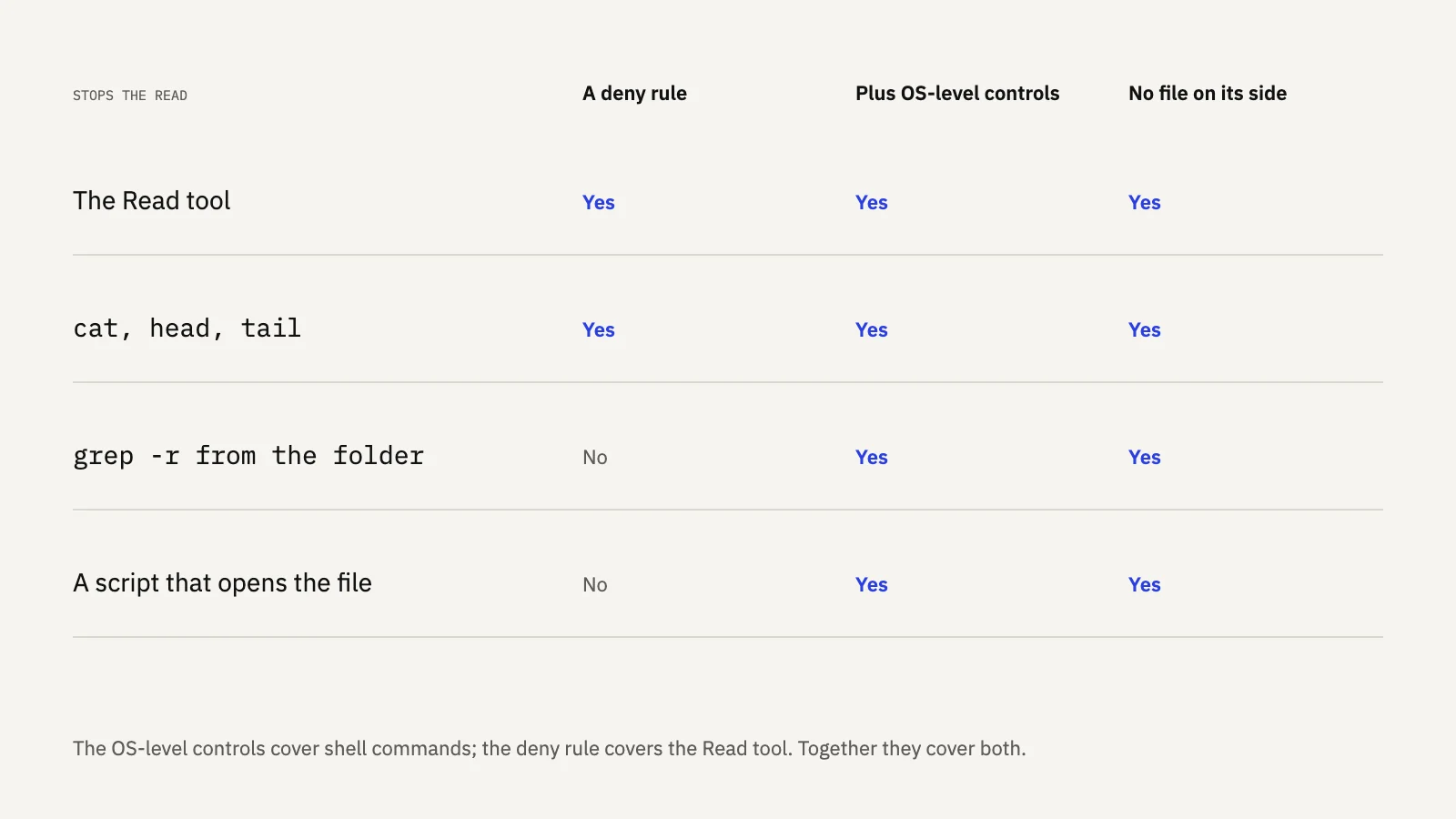
Add a Read deny rule for the path to Claude Code's settings. That stops its file tools and the shell commands it recognises as reading a file. It does not stop a script that opens the file itself, so for anything that matters, also turn on Claude Code's OS-level controls for shell commands, and have your organisation require both. A .claudeignore file does nothing.
Step one: a deny rule
In .claude/settings.json in the project, or ~/.claude/settings.json for every project:
{
  "permissions": {
    "deny": ["Read(./.env)", "Read(./secrets/**)"]
  }
}
Claude Code's documentation gives this exact pattern: "add a Read deny rule for its path, such as Read(./.env) or Read(./secrets/**)". The paths use .gitignore pattern syntax.
Not a .claudeignore file
Several widely read posts recommend a .claudeignore file. Claude Code's documentation says: "If your project has a .claudeignore file, it has no effect, so move its entries into Read deny rules."
What the rule covers
The documentation says Claude Code "makes a best-effort attempt to apply Read(path) deny rules to all built-in tools that read files like Grep and Glob", and to @ mentions and the open-file context an IDE shares. In a shell command it can analyse, the rule also applies to "file commands it recognizes, such as cat, head, tail, sed, and tee."
What it misses
The same page:
"They don't apply to a command that reads files without naming them, such as grep -r pattern . run from the directory that holds the file. They also don't apply to arbitrary subprocesses that read or write files indirectly, like a Python or Node script that opens files itself."An agent that runs your tests runs scripts. If a test or a helper script reads the denied file, the deny rule is not consulted.
Step two: the OS-level controls
For shell commands, Claude Code can enforce file access at the operating-system level rather than by reading the command. Its documentation calls this the way to get "OS-level enforcement" on shell commands. The setting is sandbox in the same file. The documentation's own example keeps shell commands out of the home directory while allowing the project; list the paths you want kept out the same way, in denyRead:
{
  "sandbox": {
    "enabled": true,
    "filesystem": { "denyRead": ["~/"], "allowRead": ["."] }
  }
}
Two things to know from the documentation. Its file-path list does not cover the Read tool: "A denyRead entry doesn't stop the Read tool", which is why you keep the deny rule from step one as well. And by default a command that fails under the controls can be retried without them, which the documentation shows how to turn off.
To keep the agent to the project folder altogether, permissions.blockReadsOutsideWorkingDirectories makes "the file tools refuse reads outside the working directories in every permission mode".
Step three: make it stick for everyone
A developer can edit their own settings. An organisation that needs the rule to hold puts it in managed settings: a managed-settings.json file, a device-management policy, or settings delivered from the Claude console. The documentation describes managed settings as applying to "every project on every machine your organization deploys it to", and settings there cannot be overridden by a developer's own.
What this does not solve
All three steps keep a file from an agent on a machine where the file is on disk. That is the right tool for a credential, and for code the agent never needs to build.
When the agent must build against the code, for example a contractor's agent working beside your billing module, the file has to be on disk for the compiler, and the rules above are all that stands between it and the agent. What AI coding agents' ignore settings actually block compares the same question across Cursor, Copilot, Devin Desktop and Codex.
Where Occlude fits
In Occlude, the agent connects to a workspace in your cloud over MCP. Files outside its task are not on its side of the workspace, while the build still reads them. There is no rule to get right, because there is no file to deny. Agents over MCP shows the Claude Code configuration.
Sources
Each page last read on 28 November 2026.
- Claude Code: permissions.
- Claude Code: OS-level controls for shell commands.
- Claude Code: settings and settings reference.
Want to go through this for your codebase?
Or write to contact@occludehq.com
Not ready to talk? Step through a session on a sample repository